
“Why you can trust Digital Trends – We have a 20-year history of testing, reviewing, and rating products, services and apps to help you make a sound buying decision. Find out more about how we test and score products.“
Like the netbook, the nettop PC has a cute look to it that makes it easy to envision sitting anywhere from sitting on a desk to next to an HDTV. Asus, the manufacturer that inadvertently started the netbook craze, is betting that there is some longer-term viability to these diminutive PCs. The Asus Eee Box 1501 is one of the few nettops that doubles as a DVD player, but it’s the way it handles all other video that makes it a bit of a conflicted device.
Our Asus Eee Box 1501 review unit was running on an Intel Atom 330 processor at 1.6GHz, 2GB of DDR2 RAM, a 250GB hard drive, nVidia ION Integrated video card and Windows 7 Home Premium 64-bit for the operating system.
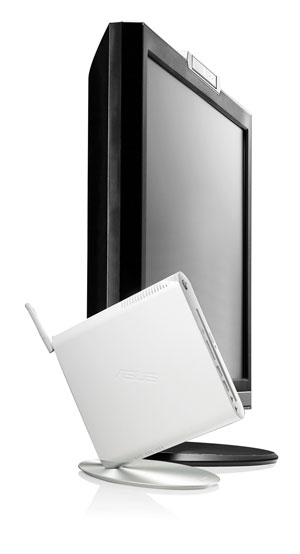
The Eee Box 1501 has a slick design, even if the included optical drive makes it slightly bigger than comparable nettops. We felt there was a bonus in that the Eee Box didn’t feel too hot, nor make a lot of noise, except for the times it would take in a CD or DVD.
The Eee Box 1501 has a number of ports, which seem to fall in line with other nettops on the market. The slot-in DVD player is the most unusual. There are six USB ports in all, two in the front, with another four in the back. The front panel also has a memory card reader that takes SD, Memory Stick and MultiMediaCard, along with headphone and microphone jacks. There’s also an IR-receiver for use with the included remote control. On the back are a gigabit Ethernet port, eSATA port, HDMI output, VGA port (couldn’t they make it DVI instead?) and a S/PDIF coaxial output for supporting 7.1 surround sound.
Wi-Fi up to 802.11n is in the mix, but Bluetooth isn’t. Ditto for the lack of a TV tuner, a feature that should be a practical no-brainer for a unit like this. You can get around this by using a USB tuner, but some of them are so thick that they end up taking up two USB ports.
The included wireless keyboard and mouse run on AAA batteries, and communicate with the Eee Box through an included USB receiver. The keyboard is actually quite nice, and doesn’t feel cheap when compared to those found in competitor models, but the mouse feels quite the opposite. Just as with Acer’s AspireRevo R3610, the included mouse pales in comparison to the superior tracking you get with an aftermarket mouse like Microsoft’s Bluetrack mouse. Being able to navigate on just about any surface made it easier to use the Eee Box with an HDTV.
The remote is a nice addition, particularly when using software that makes it easy to navigate through menus for your media. But there’s also the added benefit of playback controls for CDs and DVDs, and a number pad, which makes it a lot easier to change channels when watching TV through a digital tuner.
As seems to be common with nettops, Asus also included a bracket for mounting the Eee Box behind a monitor.
Without fail, Asus has packed the Eee Box with enough bloatware to keep you busy moving it away from cluttering your desktop. You get the usual suspects of Asus-branded apps, anti-virus, trials and a litany of other stuff that you would likely replace with your own preferences.
The Eee Box runs Windows 7 Home Premium very well, though it’s the 32-bit version, not 64-bit as you might expect. Windows Media Center comes pre-installed as well, and works beautifully with the included remote. Add in the Home Group feature that ties in all Windows 7 PCs in a home network, and it becomes very easy to share files between them, helping to offset the small 250GB hard drive.
While the Eee Box comes off as a sleek machine, we’re a bit unsure that the overall performance and limitations warrant the $450 price tag. A lot of this has to do with graphics-intensive apps and games. The Eee Box isn’t meant as a gaming machine, but it can handle older games up to a few years ago, depending on how much rendering is involved. For example, a first-person shooter might pose more challenges than a strategy game like Age of Empires or Civilization. There’s trial and error involved here, so it’s hard to pinpoint what type of game will work and what won’t.
 It is important to note that the Eee Box can play 1080p video, though we found this isn’t an absolute. Some 720p movies we tested were fine, but we tried a Blu-ray rip, and the unit just couldn’t keep the bitrate up enough for smooth playback. That said, the nVidia Ion chip does an admirable job when you consider the specs under the hood. Being a dual-core Atom configuration, the CPU isn’t pushed as hard as it would be with a single-core setup. Watching video sites like YouTube and Hulu was a pleasant experience, though we highly recommend that you update both Flash and the latest Ion drivers to ensure a smoother view.
In addition, Asus offers three settings to use the unit: power saving mode, performance and super performance. Surprisingly, performance doesn’t seem to be all that different, no matter what you’re doing. As a desktop computer that be used for basic surfing, word processing and other simple tasks, the Eee Box performs just fine no matter what you use. And the slot optical drive made it easier to install software we had on disc.
However, once we started working with applications that required loading times and processes, like Photoshop and Audacity, for example, we noticed that it took much longer than it should to complete.
Despite the Eee Box’s good overall performance, it’s hard to see how this configuration makes sense long term. When compared to other nettops like Dell’s Inspiron Zino HD and even the cheaper Acer AspireRevo R3610, the Eee Box is in a bit of a predicament. It’s fairly elegant and a little expensive, yet it offers a level of performance that can be matched or outright surpassed by PCs that cost less and have better components.
HD playback also presents a conundrum. It can play some 1080p video, but certainly not anything at that resolution. This poses a problem, especially if your setup includes streaming an entire media library from another computer or network attached storage. With that part of its repertoire being inconsistent, the Eee Box doesn’t make the most compelling case for purchase.
It will fit perfectly in any home theatre setup aesthetically, but for sticklers of high-quality video looking to have something viable, there’s enough competition out there now to make the Eee Box look more ordinary than it should be.
Did you think hitting delete on your AI chatbot conversation actually makes it disappear? Georgia Tech researchers just proved that's not entirely true. They have built a forensic tool called ORISA that can dig deleted conversations from your phone and even rebuild them into a working chatbot session you can keep talking to.
How can ORISA bring deleted AI conversations back?
Touchscreen laptops have been around for years. You can get them in all sizes and shapes. Just not from Apple. For years, the Cupertino giant has treated the idea of a touchscreen MacBook the way I treat a meeting that could have been an email: with open contempt. However, Wednesday looks like the day the company could finally change its mind.
The latest Apple invite puts the “Pro and Tell” showcase in Los Angeles at 10 a.m. PT (1 p.m. ET) on October 28, 2026. Instead of a regular live-streamed keynote, it is an invitation-only, hands-on event for a handful of press and creators (similar to what the company did for the MacBook Neo earlier this year).
Two residents of Chicago have filed a lawsuit in the US over claims that robots run by Coco Robotics and Serve Robotics captured their facial and hand measurements without consent, bringing renewed attention to the food delivery robots. The cases raise a troubling question: If a robot delivers food to your door, can it also be gathering sensitive information about you?
According to a report by The Associated Press, the proposed class-action lawsuits were filed in Cook County on Oct. 9 and allege violations of Illinois’ Biometric Information Privacy Act. The complaints claim that the robots’ cameras and LiDAR sensors captured information on customers’ faces and hands as they approached the machines to pick up their orders. Both have denied the allegations.