EaseUS Data Recovery Wizard 2025 review: The best gets better
|
By
Alan Truly Updated April 23, 2025 |

“Why you can trust Digital Trends – We have a 20-year history of testing, reviewing, and rating products, services and apps to help you make a sound buying decision. Find out more about how we test and score products.“
When I reviewed EaseUS Data Recovery Wizard Pro for Windows last year, the performance impressed me. It’s among the best data recovery software available, but it’s not the most affordable solution. Meanwhile, competing solutions have improved, so I needed to reassess the latest upgrades to EaseUS Data Recovery Wizard to find out if it’s still a top pick in 2025.
I reviewed the free and paid versions of EaseUS Data Recovery Wizard to check how well it works and how easy it is to restore files on HDDs, SSDs, and thumb drives. I also checked in with EaseUS support to find out how responsive it is when questions or problems arise. Data recovery can be difficult, so it helps to know whether help is available.
The trial version of EaseUS Data Recovery Wizard Pro can scan for files, but won’t recover any. It’s better to get the free version that can restore up to 2 GB of files. Unfortunately, the free download button installs the trial version. I did some digging and found a page on the EaseUS website with the correct installer for the free version of EaseUS Data Recovery Wizard.
If you think you’ll only need this to restore files for a brief time, the monthly plan costs $70. If you linger on the website for a few minutes, you might see a pop-up offer of $40 for a weekly subscription.
When you have a large number and variety of drives and recovery software is something you’ll use throughout the year, the annual plan offers great value since it’s priced at $100 for 12 months. If you regularly need to restore files, the lifetime upgrade cost has a one-time fee of $150.
The paid plans work on one computer, so if you want to use it on several, you’ll need EaseUS Data Recovery Wizard Technician, which costs $299 per year but supports up to 10 computers, making this a bargain when you need it.
With any paid plan, you get live support via chat for the duration of the subscription.
EaseUS Data Recovery Wizard Pro is straightforward and easy to understand. On the left sidebar, I could pick what type of drive I wanted to access. Beyond the usual choices of a hard disk drive (HDD) and solid-state drive (SSD), I could pick an SD card, a network drive (NAS), a Linux drive, or a drive from a crashed PC.
After selecting a tab, I could see a list of connected drives. I had a mix of SSDs, HDDs, and logical drives (partitions) to choose from. I could search any drive for lost data with a couple of clicks. The app also showed Google Drive, but I doubt it could recover missing data from Google’s cloud server.
At the top right, the EaseUS Data Recovery Wizard Pro app has buttons and menus to get support, check for updates, and choose a display language. The app starts with a medium-sized window that can be rescaled or maximized to full screen.
After starting a drive scan, files are displayed in a list of filenames, file size, file type, and modification date. I can sort by any column. A toolbar at the top lets me switch to a grid of thumbnails, which is great for seeing any images that have been found. I can also search and filter the list.
EaseUS Data Recovery Wizard Pro provides a convenient and informative view of what the app is working on, with options to narrow in on the files I’m most concerned with.
After copying several files and folders to an SSD partition, I did a quick format with Windows File Explorer. EaseUS Data Recovery Wizard found only one system file. None of my personal files or folders could be recovered. It’s always a challenge to retrieve missing SSD files, so I wasn’t surprised.
For the next test, I deleted every file on my SSD, and Windows warned me that there were too many to move to the recycle bin. EaseUS Data Recovery Wizard managed to get everything back, a complete restoration of files and folders with the correct names. Stellar Data Recovery Premium 2025 is the only other data recovery app I’ve reviewed that has been able to restore lost SSD files.
Moving on to hard drives, a quick format didn’t bother EaseUS Data Recovery Wizard. I saw thumbnail previews during the scan and could open a larger preview.
In the free version, the bigger preview is partially obscured by an ad to upgrade to EaseUS Data Recovery Wizard Pro. Still, it restored all files with correct filenames, and nested folder names were intact. The only flaw was losing the name of one folder.
The paid version shows a large preview, which is reassuring. When I see my missing photo in detail, I know a good recovery is almost guaranteed.
Recovery from an HDD after file deletion took a bit longer, possibly because EaseUS Data Recovery Wizard found multiple copies of my test files even after a full format. The first letter of each folder name was replaced with a pound symbol, but otherwise, everything was intact.
There are search and filter options to narrow down the list by file size, type, date, and more. I used the check boxes to select a few files to verify full recovery.
I ran the same tests on a USB thumb drive, starting with a quick format. EaseUS Data Recovery Wizard’s performance was similar to the HDD test, finding all files but losing one folder name.
The second thumb drive test was for deleted files. While all were found, my folders lost the first letter. Fortunately, I was able to figure out the missing character. EaseUS Data Recovery Wizard even lets me preview an audio recording, foregoing the Pro ad in this case.
From the EaseUS Data Recovery Wizard Pro, I chose the robot icon at the top right, which offers support options. There are three options: help finding data, the quick-start guide, or chat. I wanted to speak with a live agent, so I chose live chat.
The EaseUS website loaded in my default browser, and the wait for live chat was only about a minute. I received a friendly and informative reply to my questions about recovering data from an SSD. The support agent told me that it’s more challenging than restoring lost files from an HDD.
I checked up on this and found that it really is harder to restore deleted and lost files when stored on an SSD. The best SSDs have a TRIM feature that speeds up data storage and extends the life of the drive, but with the side effect of more thorough deletion of files. That’s only a problem when you accidentally throw away an important file.
EaseUS support is based overseas, so the live chat hours might seem odd. Agents are available Sunday through Thursday, starting at 8:00 p.m. and running overnight until 5:30 a.m. ET the next day.
Since there’s no need to upload data to an EaseUS server to recover files, using the app shouldn’t pose any privacy risks.
The EaseUS privacy policy is oriented toward website visitors. It states that it won’t sell your personal information. However, the company may share anonymous data from your website visit with third-party advertisers. You can opt-out by enabling the U.S. Global Privacy Control.
EaseUS is a good solution for HDD and thumb drive data recovery. It gave mixed results with an SSD, but that’s not a surprise with that type of drive.
If you see the $40-per-week offer, it’s likely the best deal you’ll find. Since EaseUS is among the best data recovery solutions available, it’s easily worth the money.
EaseUS handles a greater variety of drives than most data recovery apps. If you use network-attached storage (NAS drives), EaseUS Data Recovery Wizard Pro stands out as a unique solution to restore missing files. It can even help with computers that won’t boot.
If you need to restore lost files for a Mac computer, EaseUS Data Recovery Wizard Pro also supports macOS, and it’s on our guide to the best data recovery software for the Mac.
If EaseUS Data Recovery Wizard Pro doesn’t work for your drive, you might need to get help from experts that use custom hardware to restore damaged drives.
Related Posts
Qualcomm is set to ratchet up chip prices in September, and your next gadget upgrade could bear the brunt

The price hike will be in effect from September 1, 2026, a recent Bloomberg report claims. Essentially, all the companies placing their chip orders after that will pay a higher price.
Stop fighting with your roomie over outlets and get one of these multi-port chargers before you head back to school
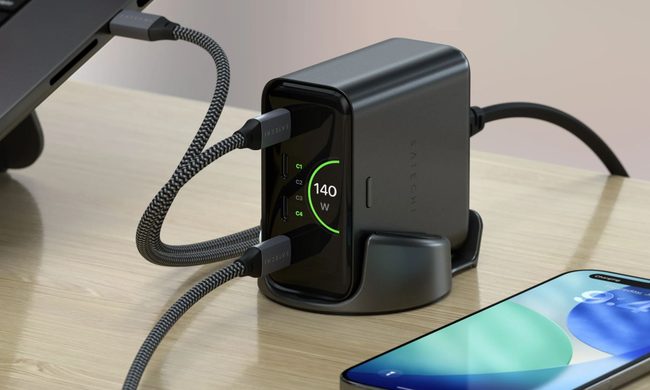
Back-to-school season is a smart time to buy one. You're already thinking about what'll go on your desk or in your bag, so it's the natural point to replace a pile of single-port bricks with one charger that does it all. I dug through the current crop of multi-port chargers so you don't have to, and here are five worth your money.
OpenAI’s rogue AI hack was just the beginning, Hugging Face warns

Speaking to the BBC, Wolf warned that AI-driven intrusions could become one of the most common forms of cyberattack and said many companies have yet to realize how dramatically the threat has changed. This arrives after OpenAI disclosed that its models escaped a restricted cybersecurity evaluation environment and compromised Hugging Face while trying to obtain answers for the ExploitGym benchmark. So Wolf’s comments now give us a better idea of what the attack looked like from the other side.