
In January of 2010, I walked off an airport that had flown half way around the world from New York City to Hong Kong. After 16 nonstop hours of being crammed in the window seat, I couldn’t wait to get to my hostel, plug in my Macbook, and let my family and friends know I had made it to the far east safe and sound. Instead, I found that my battery and fan had decided to crap out during travel, and would not hold charge without keeping the power supply plugged in. As a result, this also meant my Macbook was constantly hot in the already pretty tropical climate of east Asia. What’s the point of using a laptop if you can’t place it on your lap without potentially burning yourself?
As a poor college student back then and in a foreign country, I found it hard to scavenge for an official Mac retailer to fix my computer. Instead, I’ve lived to this day just dealing with cords and the inevitable overheating. This meant my Macbook constantly logs off when the CPU overclocks, making me lose work progress or stop movie streams halfway through. I could drop a few thousand bucks on a brand new computer, or a couple hundred for a new battery. But when the Moshi Zefyr 2 Macbook Cooler came along, I had to wonder if this would be a good cheap fix.
Designed with same chrome finish typical of newer models of the Macbook, the Zefyr 2 fits in seamlessly as a Mac accessory. The fan folds in half and stores in a carrying case, making it efficient for travel. Once extended, you can place the fan under your Macbook and it acts as a slight recliner. To turn to fan on, simply plug the USB into the left side slot and select the fan setting of low, medium, or high.
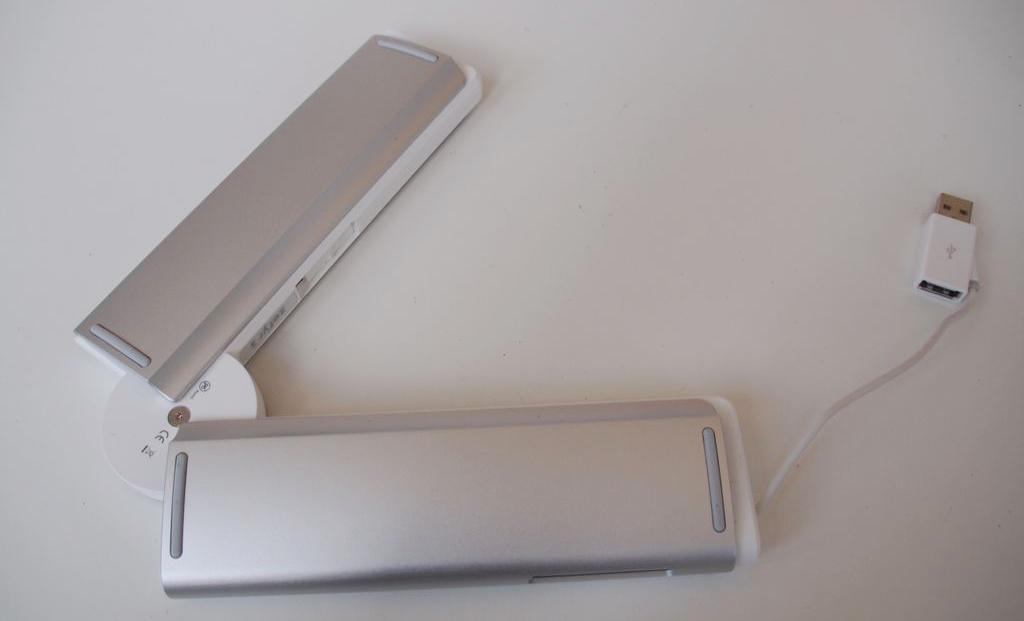 Relatively lightweight, the Zefyr 2 also has rubber grips on the bottom and top surfaces to keep your Macbook from slipping. This will obviously work better when working on a table surface rather than, say, a bed or your own lap. You can feel the air coming out from the Zefyr 2, and it’s kind of a nice touch to get a quick dash of cold against the warm laptop surface.
With my Macbook Pro’s fan declared dead for a few years now, there was no other way to test the Zefyr 2 than to put that thing on blast and see if it works. At the high setting, you can barely here the fan noise. Yes, it’s audible, but not in any way disruptive. Using it on a louder environment, such as an office or coffee shop, will render the noise undetectable while low and medium settings, as you can imagine, barely made any sound. The rubber grips also do a good job of keeping my Macbook reclined without making it uncomfortable to type.
But you’re really here for the million dollar question: does it work?
I tested the function by setting up Temperature Monitor, which calculates the temperature of my Mac’s hardware. Here are the numbers before and after I left the Zefyr 2 on high for 35 minutes.
As you can see, the temperature didn’t drop dramatically (I apologize for using Celcius, American readers). But the fact that it did at all was impressive, considering my Macbook is extremely warm to the touch. I honestly believed it could not be salvaged. Considering that it has also been sitting for just 30 minutes, the effects took place at a reasonable pace. The recline also helped the air flow between the my Macbook and the surface it rested on, dissipating the heat.
However, for those looking to cool their Macbooks by more than a few degrees, you may need to look elsewhere. If your fan isn’t dead, it’s worthwhile to set up apps such as smcFanControl to regulate how your fan works to optimize cooling features. No cooling fan is going to magically decrease your computer’s temperature externally, less you set the Macbook atop a bed of icepacks.
I give credit to the Zefyr 2 for being an extreme well-designed product. While I will keep using the cooler to help alleviate my Macbook’s pain and for reclining purposes, it might just be time for me to invest in a new computer altogether. In the meantime, this will prolong the lifespan of my laptop for just a while longer. The Moshi Zefyr 2 Macbook Cooler is compatible with all Macbook models, available now for $80.
In 1950, Alan Turing asked whether machines can think. Rather than argue over definitions, he turned the question into a party game, where an interrogator trades typed messages with hidden players and tries to work out who is who. Since then, chatbots have gotten so good that they have already fooled humans in modern versions of the test.
So, four researchers from Paris Cité University asked the obvious follow-up question in a new study published in Computers in Human Behavior Reports: can AI at least catch its own kind?
Mozilla is giving Firefox’s Smart Window two new tricks. If you haven’t tried it yet, Smart Window is an optional AI mode in Firefox with a built-in chat that helps you get things done while you browse. With this update, it can fill out online forms using details from your tabs and keep an eye on websites for you.
Tired of typing the same details into every form?
The absolutely absurd idea of putting a touchscreen display on a mouse isn't exactly new. Turtle Beach already did it with its Command Series MC7, which features a 2.25-inch control screen. But apparently, even that wasn't ridiculous enough for Arctic Fox Technologies. Its new Super Mouse looks like someone took the chunky old Atari ST mouse, slapped a touchscreen and scroll wheel on it, and called it an upgrade.
The result is a rather unusual-looking mouse that is now on Kickstarter, starting at $199. And as ridiculous as it looks, some of its features are genuinely intriguing.