
“Why you can trust Digital Trends – We have a 20-year history of testing, reviewing, and rating products, services and apps to help you make a sound buying decision. Find out more about how we test and score products.“
When word slipped in August that HP was looking to kill off its personal computing business, it came as a shock to many consumers. Some have wondered if HP would simply going to stop making laptops, leaving holes on the shelves of Best Buys across the nation.
Whatever fate holds for the future of the company’s PCs, the short term impact is zip. Zero. Nada. For evidence, I refer to exhibit A: an HP Envy 14, the company’s flagship, which recently arrived in our office for review.
 The Envy sub-brand itself was born out of corporate buyouts, growing fully-formed out of the head of boutique manufacturer Voodoo PC after it was purchased by HP to beef up its selection of high-end products. Early versions were beautiful, but not exactly in line with the design of the company’s less expensive laptops, making its usefulness as a halo product questionable.
Far from satisfied to rest on their laurels, however, HP has consistently updated the Envy, bringing its style more in line with relatives and keeping the hardware cutting edge. This brings us to this current model, which packs a Core i5-2410M processor 6GB of RAM and a Radeon HD 6630 graphics card into a 14-inch laptop frame. Although these specifications are impressive, they actually represent a base model. Our review unit’s only upgrade was a 750GB Western Digital hard drive, bringing the retail price to $1079.
That’s a premium price tag, so the Envy needs to live up to it. Let’s see if it can deliver.
Early HP Envy laptops were beautiful, thin aluminum nuggets of awesome which, ultimately, under-performed their aesthetics. Compared to that benchmark, the new HP Envy 14 is a little disappointing. That’s not to say it is unattractive, but the new models have a subtle textured design that reminds us of the wallpaper in our grandparent’s house. Some may think its retro-cool, but personally, we find it gaudy.
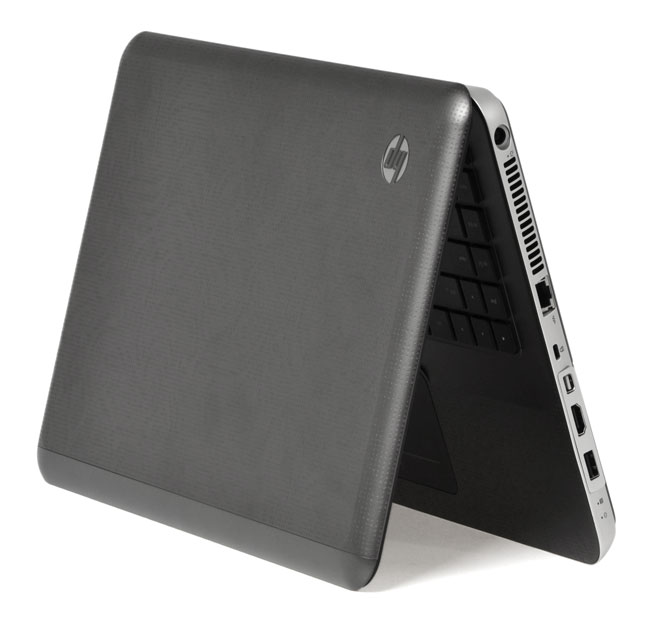
 Fortunately, the texture is so subtle that you can typically ignore it if you choose, at which point the Envy’s dark gunmetal color scheme is a bit dull, but also suggestive of the robust chassis that becomes evident the moment this laptop is handled. The Envy doesn’t feel particularly thin or light, but it does feel solid, as if it has a unibody chassis (it doesn’t). No squeaks or rattles will be found here, and even the display hinges feel sturdy and deliberate as the laptop’s lid is opened.
As with other recent HP laptops, the underside of this model is smooth, with no battery to be found. Users can still remove it easily, but it is now hidden behind a panel that is released with the flick of a single latch. Other laptop manufacturers might want to take note of this design, as it adds a feel of luxury without sacrificing functionality.
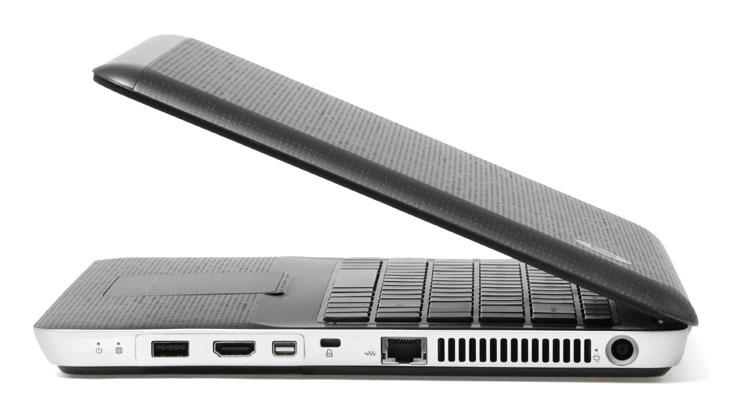
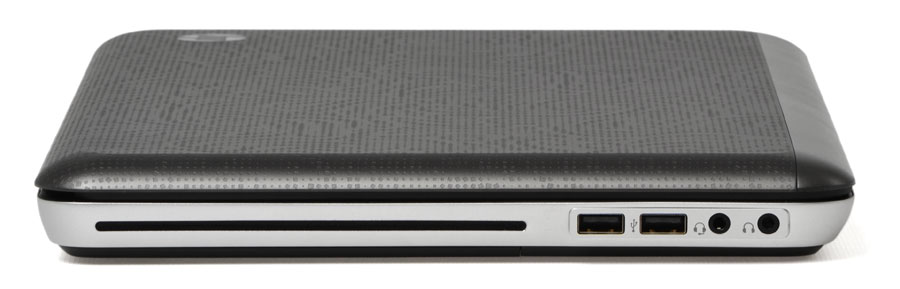 Speaking of which, there’s a fair amount of connectivity, including three USB ports (one is combined with eSATA), HDMI, mini-DisplayPort, Ethernet and individual headphone and mic jacks. Up front, a card reader lurks near the touchpad. Not a bad set of ports.
Given the 14-inch display size and corresponding chassis, this laptop lacks room for a numpad, but offers plenty of space for a full-sized keyboard and an extra row of function keys along the right side consisting of home, page up and down, and a few others.
Each key is separated in the island style, with large gaps providing tactile feedback for touch typists on the hunt for the proper key. Though we no longer have it available for comparison, the layout of this keyboard seems very similar to that of the HP ProBook 5330m we recently reviewed.
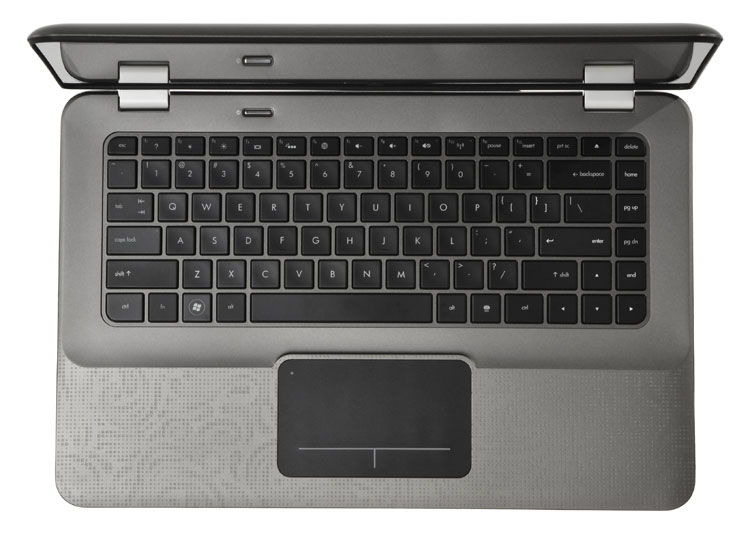 That’s not entirely a compliment. While generally a pleasurable experience, some additional key travel and crisper feedback would be of benefit. There’s also some keyboard flex evident even under light use, which is easily noticed due to the top-notch feel of everything else on the laptop.
Fortunately, the Envy’s touchpad is a pleasure to use. To click, users must depress the lower half of the touchpad, similar to a MacBook. While we generally prefer individual buttons, this solution works nearly as well, and has the benefit of expanding the usable surface. Multi-touch gestures work as well on this laptop as they do on any Windows machine, and scrolling feels particularly smooth.
Though the Envy’s display resolution of 1366 x 768 isn’t going to cause geeks to weep tears of joy, the rest of its qualities are worthy of praise.
Due to edge-to-edge gloss that spans both the display and its border, reflections can be a bit of a problem, but they’re usually defeated by the backlighting. The benefit of that gloss is strong contrast that gives colors real punch. Place this laptop next to most others, and it’ll become instantly apparent that HP has something good going on.
 Black level performance is a bit short of stellar, but strong for a laptop LCD, as all but the first two blocks of the Lagom LCD black level test are visible. In gradient test images, there is almost no banding apparent, and while dithering is visible in the darkest regions of the sample, it’s minor and likely won’t be apparent in normal use.
Audio comes courtesy of HP’s Beats Audio branding, and it’s clear that the company’s focus on sound quality has paid off. There isn’t as much bass available, as one might expect considering the Beats name, but that’s actually a benefit, because it prevents bass heavy music from inducing distortion. Vocals remain clear even when there’s a lot happening behind them, and the volume is enough to fill a living room. Most consumers probably won’t feel the need to supplement this laptop with a set of external speakers.
While this laptop’s name (emphasis on 14) suggests a relatively small PC, the reality is different. The display panel is actually a 14.5-inch unit, and the chassis remains 1.16 inches thick throughout. Even the weight of 5.69 pounds is more than one might expect from a premium laptop.
Clearly, this is no ultraportable, or even a thin-and-light. Yet the size and weight is manageable, as this laptop will fit into almost all backpacks and larger messenger bags without issue. While a hardcore traveler would likely find this laptop too unwieldy for use on or between flights, those who simply move about town shouldn’t have trouble toting this laptop along.
 Endurance certainly isn’t going to restrict your use. In our Battery Eater test that taxes the PC to its max, the HP Envy 14 lasted exactly an hour and 45 minutes, which is impressive for any laptop with discrete graphics. The Reader’s Test, which does not engage the graphics card, extended battery life to just shy of five hours. While this may be a bulky laptop, you won’t find yourself having to hunt for a power socket too often.
Given the powerful hardware inside this laptop, it’s not surprising that the system fan spins without pause. It’s loud enough that it will be audible in most situations, but not loud enough to become annoying.
The benefit of the noticeable fan noise is cool system temperatures. At idle, and during light use such as web surfing, the laptop’s surfaces remain nearly as cool as when the laptop is turned off. This is one of the only laptops we’ve recently reviewed that remained comfortable after hours of lap use.
Stress-testing did little to change the situation. While the fan become much louder, the system warmed only slightly. Lap use would be uncomfortable for most users, but the keyboard area never warmed noticeably with the slight exception of the right side, which received some heat from the system fan exhaust. This laptop would enjoyable to use even with the processor pegged at a consistent 95-percent load – an unlikely real-world scenario.
Surprisingly, there were no stray icons to be found on the desktop when Windows was first booted. Instead, HP has placed the handful of pre-installed software icons on the taskbar. Arguably, this is more annoying, since you’ll see them at all times, but the icons are easily removed if you’re not interested.
 You might be, however, because the software includes Adobe Photoshop Elements, Adobe Premiere Elements, and CyberLink PowerDVD 10. These programs do present some utility, and for many consumers they’ll be a welcome addition.
One piece of software notably lacking is a paid anti-virus app. Instead of relying on Norton or McAfee, with their alarmist pop-ups, this laptop came with Microsoft’s free Security Essentials. Testing by AV-Comparatives has shown this to be an effective security solution, and its inclusion in lieu of an aggressive trial version of third-party protection is appreciated.
Intel’s Core i5-2410M, clocked at 2.3GHz with Turbo Boost speeds of up to 2.9GHz, is the Envy’s default processor. We’ve tested it before, and our results from this laptop were in line with those from competitors equipping the same hardware. SiSoft Sandra’s processor arithmetic benchmark reported a combined score of 36.57 GOPs, while 7-Zip reported a combined score of 7,207. Both results are better than average.
What’s more interesting about this laptop’s hardware, however, is the Radeon 6630M graphics solution. This powerful GPU turned up a score of 7,405 in 3DMark 06 and 954 in 3DMark 11. These results are among the best we’ve received from any laptop, and on par with the recently reviewed Sony Vaio C Series. As well it should be, because that laptop sported the same processor and graphics solution as our Envy 14 review unit.
PCMark 7, which tests a wide range of system components, returned a result of 2,053. Again, this is on par with the Sony Vaio C Series, and again, that’s not surprising. While this laptop has an extra two gigabytes of RAM, both this and the Sony are equipped with 7200 RPM mechanical disk drives
There’s no one area where this laptop obviously excels. While it gives the Sony Vaio C Series a run for its money on performance, it did score slightly slower overall. Though reasonably portable, it’s a far cry from the Asus U36JC. Using the keyboard and touchpad is pleasurable, but Apple’s MacBooks have a clear edge.
Yet there are small victories that vault the Envy above much of the competition. Heat buildup, for example, is rarely an issue, which means this laptop doesn’t induce sweaty-palms syndrome. The resolution of 1366 x 768 isn’t great, but image quality is above par. Battery life is solid, yet you’re not asked to give up performance in exchange, as this laptop can run with the best. Even the unusual 14.5-inch display panel feels like the perfect compromise between mainstream functionality and thin-and-light portability.
Just as critical is the fact that there isn’t anything unforgivably wrong. All of the flaws are minor and easy to forget, something that can’t be said for too many laptops. By making all the right compromises, the HP Envy 14 doesn’t feel like a compromise at all. It is instead a fast and enjoyable laptop with broad appeal. If you want a premium Windows laptop, and extreme portability is not a concern, check this one out.
Speech-to-text apps have flooded the App Store, making it easier than ever to type on our Macs with just our voice. I have previously covered one such app called TypeWhisper. However, there has been a dearth of good text-to-speech models, and most of the good ones are locked behind a subscription.
Ollama, an open-source app that lets you run local AI models on your computer, wants to change that. It works on macOS, Windows, and Linux, and your prompts are never stored or used for training.
Did you think hitting delete on your AI chatbot conversation actually makes it disappear? Georgia Tech researchers just proved that's not entirely true. They have built a forensic tool called ORISA that can dig deleted conversations from your phone and even rebuild them into a working chatbot session you can keep talking to.
How can ORISA bring deleted AI conversations back?
Touchscreen laptops have been around for years. You can get them in all sizes and shapes. Just not from Apple. For years, the Cupertino giant has treated the idea of a touchscreen MacBook the way I treat a meeting that could have been an email: with open contempt. However, Wednesday looks like the day the company could finally change its mind.
The latest Apple invite puts the “Pro and Tell” showcase in Los Angeles at 10 a.m. PT (1 p.m. ET) on October 28, 2026. Instead of a regular live-streamed keynote, it is an invitation-only, hands-on event for a handful of press and creators (similar to what the company did for the MacBook Neo earlier this year).