
“Why you can trust Digital Trends – We have a 20-year history of testing, reviewing, and rating products, services and apps to help you make a sound buying decision. Find out more about how we test and score products.“
Businessmen don’t use netbooks. Sure, all-day battery life would be nice for those long flights. They do fit awfully nice in most briefcases, too. And the Intel Atom is more than enough for Firefox, Excel and Skype. But the humble netbook has always been plagued by an image problem. They look cheap, and that’s not the impression an executive wants to exude when he lays his laptop down on the walnut conference room table.
HP set out to reimagine the netbook for the boardroom with the Mini 5101. The magnesium-chassis netbook casts aside cheap construction techniques, sprinkles in a handful of business niceties, and earns our stamp as one of the few netbooks you don’t have to be ashamed of.
Tear away the outside, and the main parts driving the Mini 5101 would resemble any other netbook: An Intel Atom processor running at 1.6GHz, 1GB of DDR2 RAM, and a 160GB hard drive, all hooked up to a standard 10.1-inch LED-backlit display. But look a little closer, and you’ll find traces of a real business machine. For instance, this little guy sports the same HP 3D Drive Guard tech as HP’s bigger notebooks, which detects falls and braces the hard drive for impact. HP’s DuraKeys resist both visible wear better than ordinary keys, and spills. And the webcam offers 2.0-megapixel resolution for videoconferencing, up from the typical 1.3-megapixel model you might find in a typical netbook. It even comes preloaded with Corel Office – not the Microsoft suite we’re all used to, but an affordable way to get cracking on documents, spreadsheets and graphics.
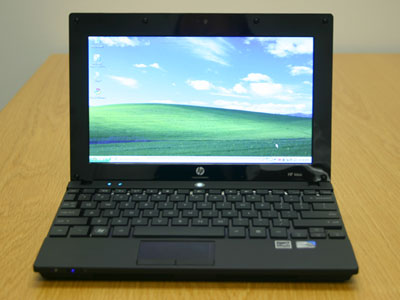
Lenovo doesn’t make a netbook decked out in traditional ThinkPad style, but if they did, it would look something like the HP Mini 5101. Although HP built the Mini 5101 from a stiff magnesium chassis, that Terminator-like skeleton has been cloaked entirely by a thick coat of almost-rubberized plastic that reminded us, precisely of the legendary ThinkPad finish. Eye-catching? Not really, but the supremely durable plastic feels soft to the touch, laughs in the face of fingerprints and smudges, and shakes off abuse that would scratch harder plastics. This is a netbook built for the long haul.
HP spices up this dull-but-durable base with a handful of design accents. Most notably, the lid sports a brushed aluminum veneer that has been anodized black. The bezel around the LCD gets a glossy black coat, and the space between the Chiclet-style keys has been doused in the same finish. Frankly, we would have preferred matte black all around, but the limited application of gloss does add a certain zing, and if you’re careful, you can avoid smudging it up pretty easily.
All that metal certainly has a positive effect on build quality. The Mini 5101 has an air of solidarity seldom felt in netbooks, from the affirmative way it closes, to the lack of flex in the keyboard or above the trackpad. You’re not quite looking at a mini MacBook, for a netbook, this is about as good as it gets.
The sides of the Mini 5101 offer up your typical netbook fare: two USB ports, a VGA connector and power jack on the left, another USB port, Ethernet jack, dedicated headphone and audio-in jacks, and SD card reader on the right. The front also has a dedicated switch for disabling Wi-Fi, which can be handy for extending battery life without meddling with software settings.
HP claims the Chiclet-style keys on the Mini 5101 span 95 percent of a real, full-size keyboard, but since typical netbooks usually advertise 92 percent, we’ll forgive ourselves for being unable to tell the difference. While the model laid into the Mini 5101 chassis performs well, it faces the same physical space limitations as every other netbook, and can’t entirely overcome them with an extra fraction of an inch. That said, it’s easily as good as or better than almost all netbook competitors, and besides frequently tripping over the shortened number 1 key over and over, we seldom had any issues with it.
Like most netbooks, the Mini 5101 also sports a rather tiny touchpad, which has been made more precarious by a slick gloss black finish. With dry fingers, it performs admirably, but try it with clammy hands and the effort needed to swipe across the screen doubles as your finger screeches across the surface like a dirty windshield wiper blade. HP could learn something from Apple or even Sony in this department, both of which have figured out the benefits of a silky matte finish.
Windows XP lives on as the operating system of choice for netbooks, and as far as we’re concerned, that’s just fine. The Mini 5101 reaches the desktop in just 30 seconds, then opens that first browser window in another 15. No need to go grab a cup of coffee – this thing is ready to work when you are. That’s snappy performance well above even many much heartier Windows 7 machines.
 The Mini 5101 performs right in line with most other Intel-Atom-equipped netbook, which puts just about every office-related business tool within reach. As usual, standard-def YouTube and Hulu videos clip along just fine, but pushing to any higher video quality will push the feeble Intel GMA 950 graphics card into water too deep.
We appreciate the lack of gloss on HP’s 10.1-inch LED backlit screen, which helped fend off glare. Sound from the forward-firing speakers was typical netbook quality: adequate, but that’s about it.
HP sells the Mini 5101 in both four-cell and six-cell configurations, with our particular configuration sporting the larger. Not surprisingly, it performed extremely well, pounding out an honest six hours of use with Wi-Fi and full brightness before petering out. It’s no Asus 1000HE or MSI Wind U123, but those models put battery life first and foremost, and this business machine has other priorities.
Professionals, rejoice: We have a netbook you can bring to your next board meeting without looking like you just learned that Windsor knot in your tie. At $399, it holds barely any premium over similarly-equipped models from companies like Asus and MSI, and we think the superior build of this particular machine easily justifies it for the right type of user. Any number of slimmer, sexier or longer-lasting netbooks might step up if you’re less concerned with durability, but for road warriors, the Mini 5101 is just what the CEO ordered.
Apple has just introduced a redesigned MacBook Pro with a few bells and whistles. The focus this time around is on a thinner and lighter build, and an upgrade to a touch-sensitive OLED screen without any ugly notch. And, in case you were wondering, there is definitely a price premium to pay for these niceties, which also include a glowing Apple logo at the back. What if you wanted to get the best that Apple has to offer? Well, the numbers are finally here.
For a mere $14,549, you can get yourself the fully kitted 16-inch MacBook Pro PROLED XDR with the beefiest laptop chip that Apple has to offer, and the best memory configuration in tow. For nearly $15,000, you treat yourself to the 16-inch version of the laptop with a nano-texture glass layer on the screen to reduce reflections and glare.
Apple has unveiled its first-ever touchscreen MacBook Pro. The company seems a bit confused about the naming, calling it the "MacBook Pro with PROLED XDR Display," which is tough to remember. If you look past that and review the full spec sheets, you might ask a genuine question: what are the differences between the touchscreen and non-touchscreen versions?
Given that Apple continues to sell both variants together, that's a genuine question. Luckily, you don't have to spend more time lining up the spec sheets side by side and hunting for differences hidden in the fine print. I took that bullet for you. Here's everything that's different between the PROLED XDR Display and the regular MacBook Pro.
MacBook Pro you can touch is genuinely exciting. We've been talking about it for more than a year. All the pent-up anticipation has finally ended. But now there's a new headache: pricing.
The new MacBook Pro with PROLED XDR Display is available in two screen sizes: 14-inch and 16-inch. Pre-orders open today, October 28, 2026, and deliveries and store stock follow on Friday, November 6, 2026.