
“Why you can trust Digital Trends – We have a 20-year history of testing, reviewing, and rating products, services and apps to help you make a sound buying decision. Find out more about how we test and score products.“
Green doesn’t have to mean garbage. While eco-friendly cars, cat litter and cleaners all leave us yearning for the Earth-devastating originals, monitors actually seem to get better as they get greener. Exhibit A: Samsung’s BX2450. The 24-inch, LED-backlit display offers similar performance to its CCFL-lit competitors, but gets thinner, lighter, and consumes only 27 watts instead of 48 watts, for an impressive electric reduction of 43 percent, while keeping image quality a priority.
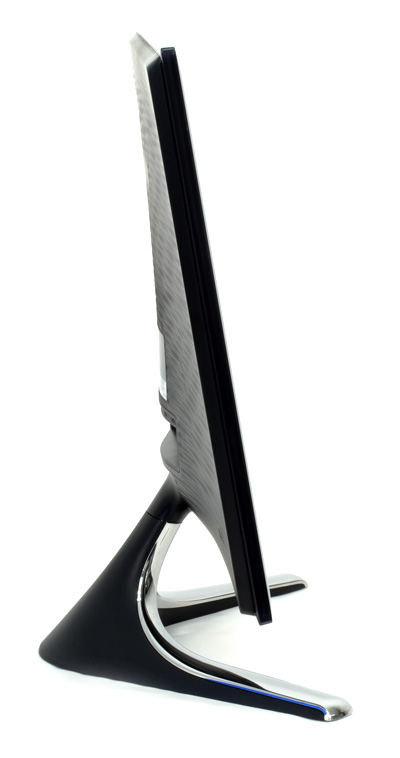
The BX2450 is a 24-inch, 1080p display and the largest in Samsung’s 50 LED series, which also includes 23-, 22-, 20- and 19-inch models. The 50 LED series fills a practical niche above the 31 series LED displays, which lack the high-end Touch of Color bezel, and below the 70 LED series, which steps up the level of many of its televisions in both design and specs. All three use LED back lighting for instant-on brightness, power efficiency, and to accommodate their ultra-slim designs. The BX2450 weighs a feathery 8.8 pounds and measures only about three quarters of an inch thick, making it light enough (though it’s not necessarily advisable) to pick up with one hand.
The LCD panel on the BX2450 offers 250 cd/㎡ brightness, 2ms response times, and displays 16.7 million colors, with a claimed viewing angle of 170 degrees horizontal and 160 vertical.
Besides the benefits of LED lighting, Samsung has packed the BX2450 with many high-end features including Magic Angle for compensating for off-angle viewing, Magic Eco to automatically turn down the brightness in dim environments, and Magic Return, which bounces the content from a second monitor to the first in the event it loses signal.
Samsung’s inky Touch of Color designs have pushed its TVs to the top of many style-savvy wishlists in recent years, and the BX2450 follows in the same artfully tread footsteps.
Rather than throwing a black plastic rim around the display and calling it a day, Samsung surrounds the opaque bezel with an overcoat of clear plastic that gives it a three-dimensional look, and at over a quarter inch thick, a nice solid feel, too. On the back, the black base blends into a scalloped plastic surface almost reminiscent of a woodcut.
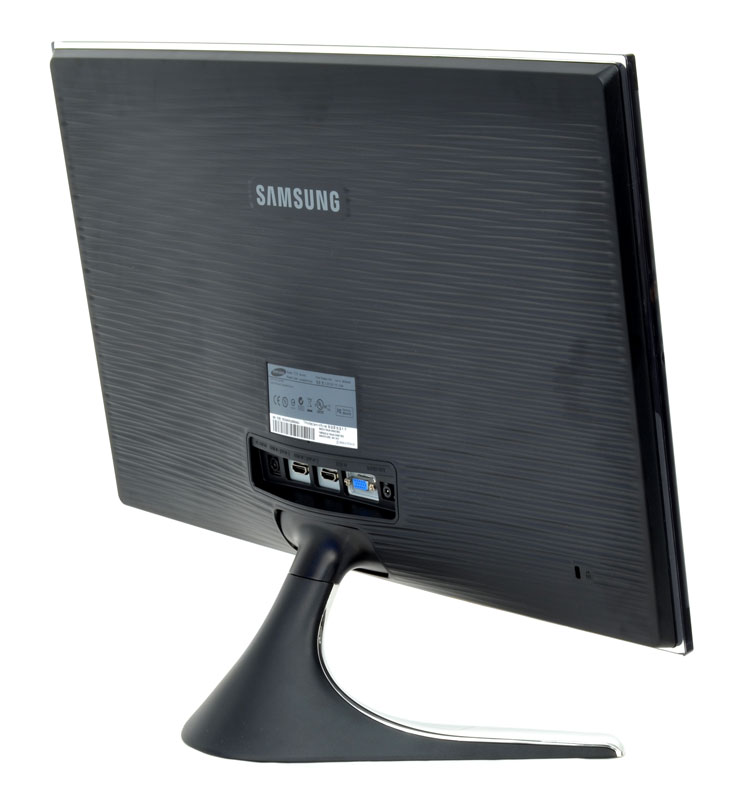 The real eye-catcher, though, is the mirror-polished stand that shoots down to the desk and splays out at 45 degrees in either direction. A quick tap will unfortunately reveal that it’s not real metal, but it pulls off a reasonable likeness and from a practical perspective, no one but the Dwight Schrutes of the world will be any wiser.
Around back, the BX2450 offers a single VGA port and dual HDMI ports, along with an analog audio output. We typically bemoan the lack of DVI in a desktop monitor, but Samsung also packages the display with a HDMI to DVI cable to ease compatibility woes. There’s a VGA cable in there too, guaranteeing you can hook the SyncMaster up to just about anything. The box also includes microfiber cloth for keeping the bezel clean, a CD with drivers and Samsung’s MagicTune software, and a thin paper setup manual.
Although the SyncMaster lies a step above budget-level displays, it’s a consumer monitor and lacks many of the extras you might find on a more business-oriented one, like a USB hub, built-in speakers, or even a VESA wall mount.
Despite its plastic construction, the faux-metal stand does an admirable job keeping the 24-inch display steady, although it’s up-and-down pivot is so stiff initially that we were initially afraid to move it for fear of snapping something clean off.
Out of the box, the BX2450 weighs in on the cool side of the color spectrum, with a bluish tinge and despite excellent brightness, it actually looks a little washed out. The fairly standard color-tone selection allowed us to warm up the image a bit, and switching HDMI Black Level to “low” rather than “normal” resolved the washed out part.
 With the image dialed in, the SyncMaster2450 delivers a sharp, well-balanced picture with accurate color and surprisingly good black levels for this price level. On the desktop, it produced bolder, more readable type than our SyncMaster P2770HD, and in games and in HD movies, its 2ms response time proved unflappable: zero motion blur. In Mafia II, it handled speeding hot rods and split-second wrist flicks to change the view without any complaint, and managed to preserve the game’s balance of light and dark without losing the details at either extreme (you never want to take a .45 in the arm because you couldn’t see fedora peeking out in the shadows). Hardcore gamers may want to enable Vsync on the game end to discourage tearing.
 Of all the battery of tests we threw at it, the BX2450’s only major failing was on gradients, which exhibited minor banding. Although it’s quite minor and never evident in photos, graphics that fade from one color to another will break into color bands rather than smoothly transitioning, an indication that it’s not able to accurately produce as many colors as monitors that can pass this muster, like the SyncMaster P2770HD.
While the Samsung BX2450 rewards users with a rich, balanced image with the right settings, prodding the buttons to get there can be a trying experience, mostly because of Samsung’s choice to use invisible touch controls rather than real buttons. Unlike the SyncMaster P2770HD, which uses LED icons that light up below the bezel to show you precisely where to touch, the monitor uses arrows on the screen pointing to the parts of the bezel that should perform different functions. Not surprisingly, considering this very vague visual cue, touches seem to register properly about half the time, making it maddening difficult to make even basic changes.
Even when they do get a click through, the menu system leaves much to be desired: There’s no explanation of proprietary Samsung features like MagicBright or MagicEco or MagicReturn, and even the paper manual doesn’t address them, so you’ll need to consult Samsung’s marketing to even know what you’re adjusting. Some features also grey out without explanation, and even though the monitor has no speakers, pressing up or down inexplicably tells you you’re adjusting the volume.
Most users will only have to deal with these inconveniences once, but it also discourages further tweaking so much that we suspect many owners will settle for subpar image quality out of the box simply because they can’t stand trying to make it look better.
Samsung’s recourse: MagicTune software, which actually allows you to tweak the monitor settings with the mouse and keyboard rather than on-screen controls. While it would be preferable not to junk up computers with additional software rather than just doing it on the display properly, we’ll admit it works amazingly well, and we were able to do in a few seconds what took a few minutes using the awful built-in controls.
For the price, Samsung’s BX2450 delivers style, energy efficiency, and with the right settings, excellent image quality. Although the controls and menu system are an impediment to reaching that last, most important aspect, users patient enough to work through it or simply install MagicTune will be rewarded with brilliant photos, crisp text, and fluid movies and games.
Apple has just introduced a redesigned MacBook Pro with a few bells and whistles. The focus this time around is on a thinner and lighter build, and an upgrade to a touch-sensitive OLED screen without any ugly notch. And, in case you were wondering, there is definitely a price premium to pay for these niceties, which also include a glowing Apple logo at the back. What if you wanted to get the best that Apple has to offer? Well, the numbers are finally here.
For a mere $14,549, you can get yourself the fully kitted 16-inch MacBook Pro PROLED XDR with the beefiest laptop chip that Apple has to offer, and the best memory configuration in tow. For nearly $15,000, you treat yourself to the 16-inch version of the laptop with a nano-texture glass layer on the screen to reduce reflections and glare.
Apple has unveiled its first-ever touchscreen MacBook Pro. The company seems a bit confused about the naming, calling it the "MacBook Pro with PROLED XDR Display," which is tough to remember. If you look past that and review the full spec sheets, you might ask a genuine question: what are the differences between the touchscreen and non-touchscreen versions?
Given that Apple continues to sell both variants together, that's a genuine question. Luckily, you don't have to spend more time lining up the spec sheets side by side and hunting for differences hidden in the fine print. I took that bullet for you. Here's everything that's different between the PROLED XDR Display and the regular MacBook Pro.
MacBook Pro you can touch is genuinely exciting. We've been talking about it for more than a year. All the pent-up anticipation has finally ended. But now there's a new headache: pricing.
The new MacBook Pro with PROLED XDR Display is available in two screen sizes: 14-inch and 16-inch. Pre-orders open today, October 28, 2026, and deliveries and store stock follow on Friday, November 6, 2026.