
Often when buying a soundbar, you’ll end up eschewing breadth and depth of sound in favor of value and effective space management. Not so with LG’s Dolby Atmos-enabled SJ9, which combines virtual surround sound with the distinctive Atmos ceiling-firing drivers, creating a massive, enveloping soundstage without requiring you to set up several individual speakers. Our LG SJ9 soundbar setup and unboxing guide will make installation a cinch, bolstering your home theater in no time at all.
In addition to the soundbar and the wireless subwoofer, you’ll get:
The power supply is built in, so there’s no need for an external cable. You won’t get an HDMI cable either, though at this point, most of us have enough of those bad boys lying around the house anyway.
You’ll find all the necessary ports and jacks in the rear of the soundbar, in a centrally located alcove. There’s an aux-in jack (in case you want a second subwoofer), HDMI in and out, optical, and an Ethernet port for servicing only.
If you’ve got an HDMI ARC cable and a TV with an appropriate port, you’ll want to connect that way. If not, use optical instead — just make sure you take off the plastic caps before plugging anything in.
Once you’ve plugged the soundbar into a power outlet, allow it to fully power on before doing the same with the wireless subwoofer. That way, they’ll automatically pair.
The curvy SJ9 is gorgeous, dressed in dark, silvery gray, with speaker grating that wraps around the front, as well as circular grates on top at either end. It features a scrolling digital readout across the front and some dedicated onboard control buttons (located on the front, near the left side) — though you’ll likely be using the remote instead.
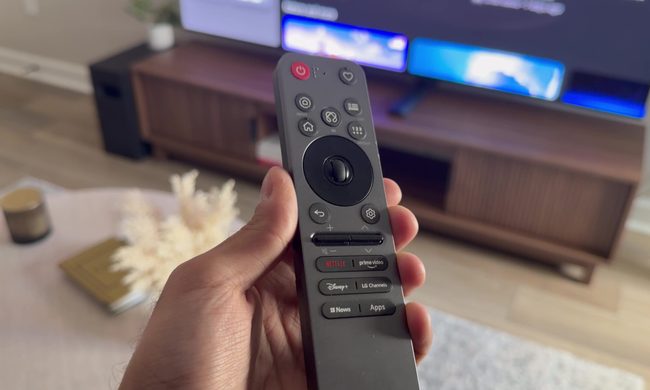
The remote itself has all the basic controls you’d expect, plus a few unique ones. There’s automatic power and volume control, buttons to adjust bass and treble balance, and even a cool “night mode” function that compresses louder sounds when you don’t want to wake up the kids.
Once everything is properly hooked up, head into your TV’s audio settings and make sure “audio out” is set to Optical/HDMI ARC, not “internal speakers” (and don’t select PCM in this instance).
If you have a newer LG television, you can select “LG Sound Sync/Bluetooth” to pair wirelessly, or “LG Sound Sync/Optical,” which will allow you to control the soundbar’s volume with your TV remote. Still, though, HDMI ARC should be your first choice. It just sounds better.
To connect with Wi-Fi, download the Music Flow mobile app (for iOS or Android), hit “Connect product,” and select the soundbar icon. It will walk you through the process to connect your SJ9 to Wi-Fi, after which it might prompt you to download an update — which you should do. After that, you should be good to go.
Related Posts
I desperately want a new classic Walkman, but Sony probably can’t give me one

All of this makes it the perfect time for Sony to bring back the classic Walkman, which was a phenomenon during the 80s and 90s. I would love one. Give me a compact cassette player, physical buttons, and wired headphones. Keep the apps, notifications, and algorithms that shape your taste of music. No more AI assistants or personalzied feeds, just you and your Walkman. There is only one problem though. Recreating the Walkman that people love and remember, would be far harder than putting an old design back into production.
Proton reveals how smart TVs track you and the escape situation is pretty grim

The worrying part is that escaping this tracking is becoming increasingly difficult because many privacy controls are buried deep in settings or enabled by default. Proton argues that buying a smart TV today often means accepting a level of surveillance that most people never knowingly signed up for.
LG is cracking down on smart TV apps that quietly turn your TV into a secret proxy
The move follows a report from security firm Spur, which found that more than 42 percent of apps on LG's webOS store include SDKs that quietly reroute internet traffic through your TV, indefinitely. Samsung isn't spared either, with over a quarter of Tizen apps carrying similar code.