
It’s been six months since iOS 7 became available, and while we certainly had more than a few problems with it along the way, we generally like Apple’s latest iOS offering. Now, iOS 7’s first major update, 7.1, is available for download, and while the .1 update doesn’t come packed with nearly as many new features, it does include several noticeable enhancements that is sure to make iOS feel better than ever.
Sure, Apple debuted CarPlay ahead of iOS 7.1’s release, but it remains the marquee feature of the update. Introduced earlier this month, CarPlay allows you to connect your iOS device to your car, letting you use Apple Maps, GPS, Siri, Phone calling, iMessage, and iTunes, from your dashboard, among other things. Even so, there are concerned groups that believe CarPlay takes emphasis away from the act of driving. Time will tell whether these groups are justified in their concerns, but it’s certainly something to look out for.
With iOS 7, Apple gave you the option of reducing the motion effect that allowed for the transition animations and for the home screen to give off a 3D look to it. By turning on Reduce Motion, the parallax feature would be turned off, but so would the transition animations. With iOS 7.1, you can now just turn off parallax while keeping transition animations intact. When selecting a new background, toggle Perspective Zoom off and voila. In addition, the Reduce Motion option now includes Weather, Messages, and multitasking UI animations.
For UK and Australian English, Japanese, and Mandarin languages, Siri now sounds more natural and calmer rather than the stilted tone people in these countries were accustomed to hearing. American English already got a taste of this more natural-sounding Siri with iOS 7. A more generally-available feature of Siri, however, is a new option to speak to it. You can hold down the home button to begin talking, and when you’re finished, release the home button. This is an alternative to Siri’s status quo, which had it automatically notice when you finished talking.
 While several generations of the iPhone include high-dynamic-range imaging (HDR) as a camera function, some of you might still be confused as to when exactly you should use it. While you are certainly not to blame for that, Apple thought it would make it easier to decide when to use HDR by enabling an HDR auto mode. Unfortunately, this feature is exclusive to the iPhone 5S, though we’re sure to see it in future iterations of the iPhone and, possibly, iPad.
Sure, iTunes Radio now has over 20 million users, but up until now, you could not buy albums from the Now Playing screen. With iOS 7.1, Apple rectified that little oversight while also adding a search field above Featured Stations in order to make stations based on whatever artist or song you search. Finally, you can now subscribe to iTunes Match from your iOS device rather than just from your computer.
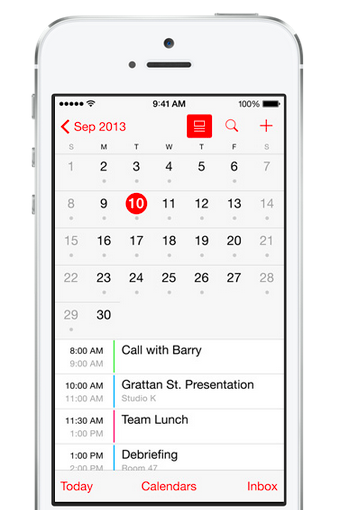 Apple decided to subtly revamp its Calendar app for iOS 7.1 by adding a new list toggle. If you so choose, you can now see events happening on different days while in month view. Speaking of different days, not every country celebrates Presidents’ Day, so Apple decided to add country-specific holidays for many other countries. Now you can have your iOS device remind you when Dominican Independence Day is without having to look at an actual calendar.
Apple also decided to make some small changes to the overall user interface with iOS 7.1. For the eagle eyed among you, changes in the Phone and Music apps, along with the dialer and keyboard, will be noticeable. Icons in the stock Weather app are filled in, while the options for button shapes and additions to the Increased Contrast setting help to improve accessibility. The “slide to unlock” animation was tweaked to allow for a greater shine effect, as well as the font across the UI.
On page one, we covered some hidden features of iOS 7.1, but here are seven more useful nuggets hidden in Apple’s increasingly dense Settings menu, available to anyone with iOS 7.0. We hope these help you save a little battery life, or time.
 If you’re scared of the NSA, or just don’t like Apple’s newfangled Touch ID fingerprint sensor, then you can easily deactivate it. Go to Settings > General > Passcode & Fingerprint. In this menu, you can Change your 4-digit passcode, make it longer, complicated word, and mess with your fingerprints on record. Enter the Fingerprints menu to scan more of your fingers (or if you’re Andrew Couts, your junk, too), and choose whether to use Fingerprint authentication for unlocking the phone and iTunes/App Store purchases. Though people are saying Touch ID has already been hacked, we still think it’s a lot better than a simple password.
Bonus: If you want to know which fingers you’ve scanned, simply touch one of your fingers to the Home button while in the Fingerprints menu. If it’s a stored fingerprint, one of the rows will turn grey for a second, indicating that you’re good to go.
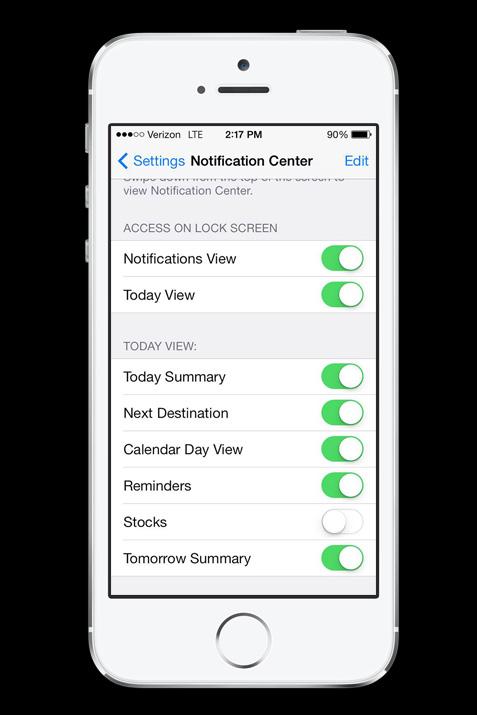 We think the pull-down Notification Center screen on the iPhone is fairly useless no matter how you slice it, but if you want to tailor it to your needs a little more, you can. Go to Settings > Notification Center and start marking and unmarking boxes. You can turn off the Today View, Calendar, Stocks, Reminders, and more. If you want to get really granular, you can enable and disable every single app’s ability to send notifications, and customize whether they come in as an alert, banner notification, or silent notification, depending how you care to be notified. Some apps can be given different sounds as well. The options are pretty robust.
 Here’s something really cool. If you’re going over your phone’s data limit, or in danger of it (that’s probably all of you), go to Settings > Cellular. In this menu you can toggle cellular data, roaming, and LTE (high-speed data) on and off, but also turn every app’s ability to use cellular data (at any time) on or off. This isn’t just background usage. If you disable an app on this menu, it won’t ever be able to use cellular data. When you enter an app that you’ve disabled, it will tell you that it can’t use cellular data. In some cases, this means your apps will be unusable unless you’re on a Wi-Fi connection. But it’s great that the choice is yours.
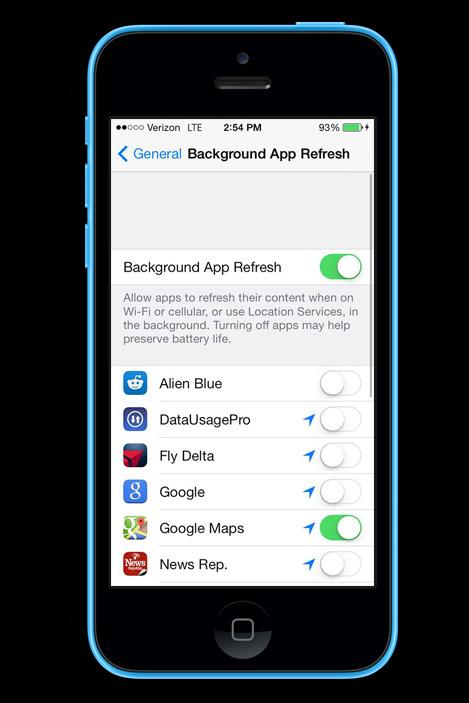 In iOS 7, Apps can now operate more freely in the background. This is often great. It means that your Podcast collection might be able to sync without you having to enter the app and have it open, among other things. However, if too many apps are running in the background, it can impact your battery life. You can toggle every app that’s capable of running in the background in Settings > General > Background App Refresh. We recommend that you let mapping apps run in the background, as well as Apple’s Weather App.
 This isn’t inside the Settings menu precisely, but if Siri is mispronouncing things for you, you may want to correct it. Simply say “that’s not how you pronounce that” and it will ask you how to actually say it. If you have more Siri questions, hit the small question mark circle in the lower left of the Siri app and it will tell you all the ways you can communicate with it. Or if you want Siri to be a man or disable it entirely, head to Settings > General > Siri.
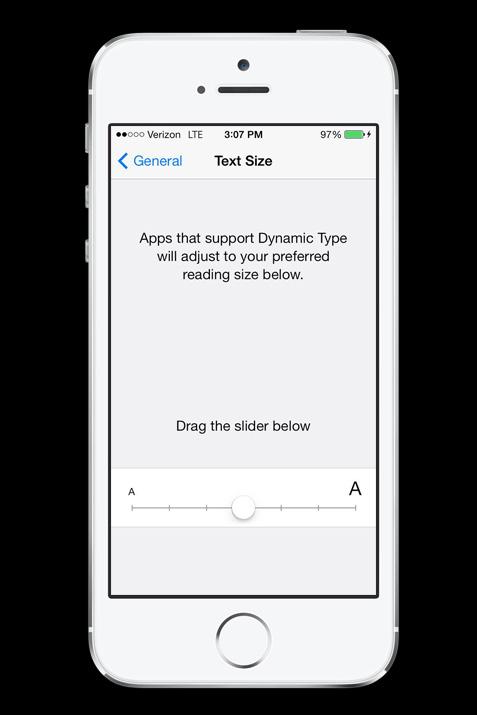 If you have terrible eyesight, then you may want to consider buying a larger phone (like a Galaxy Note), but if you also hate big phones, Apple has a few settings to help you make things easier to read. To increase or decrease the default size of text, head to Settings > General > Text Size and adjust the slider bar. If that isn’t enough, there are a few more things you can try. You can Bold Text by going to Settings > General > Accessibility. This menu also has a feature called Increase Contrast that will make menus easier to read. Finally, if these just aren’t working, try enabling Zoom (also in the Accessibility menu). This lets you tap on the screen with three fingers to zoom in and look around. Tap with three fingers again to unzoom.
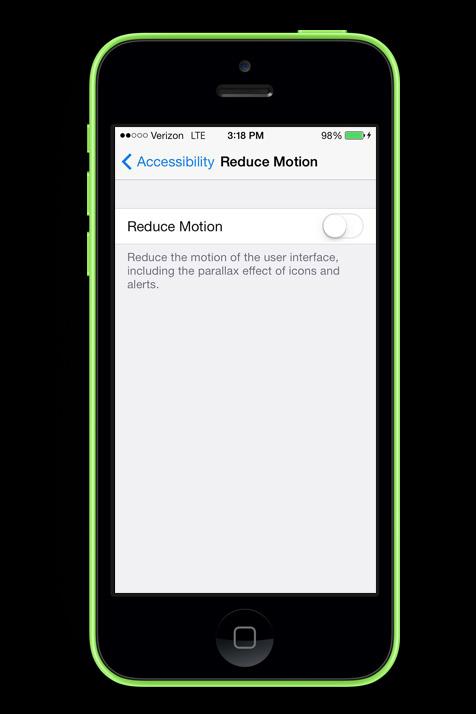 The truest sign of success for Apple is that it’s OS is used by enough people that there are some people who cannot handle the minimal animations present in the operating system. If the parallax effect (3D-like effect of icons on the home screen) and other animations are giving you headaches or making you nauseous, you can “reduce” the problem a little. Go to Settings > General > Accessibility > Reduce Motion to reduce animations. There is no easy way to entirely remove animations. You may want to invest in an Android phone (and you’ll still need a mod) to remove animations entirely.
That’s it, for now We may update this with a more complete list of Settings in the future. If you have tips you’d like to share with other users, please leave a comment below.
Updated on 3-17-2014 by Williams Pelegrin: iOS 7.1 is now out so we’ve added 7 new iOS 7.1 hidden features for your enjoyment.
Article originally published on Sept. 30, 2013 by Jeffrey Van Camp.
A virtual private network (VPN) encrypts your internet traffic and routes it through a server run by the VPN provider. Websites see the VPN server’s IP address instead of yours, and you can get around geo-blocks, censorship, and ISP throttling. The best VPN services are paid, but there are still a handful of free options that do the job well.
Most free VPNs come with a hidden cost, because running servers isn’t cheap and a company that doesn’t charge you has to make its money somewhere else. Many do so by logging your browsing activity and selling it to advertisers, while others flood you with ads and track you across apps.
There's nothing quite like curling up with a good book on a cold evening. As much as I love the feel of a physical book, books take up a lot of space, and carrying more than one on a trip quickly becomes a chore. That's where e-readers come in, and the Amazon Kindle remains one of the best options.
Amazon just refreshed its Kindle lineup with thinner, lighter designs, a new flush-front display, and colors that wrap from front to back. Add the Kindle Scribe and the Kindle Scribe Colorsoft to the mix, and you have more choices than ever before.
A good Android app should earn its place on your phone. It might make an everyday task easier, handle something the built-in software can't, or let you change an experience that never quite worked for you.
These 20 apps cover everything from quick notes and password management to automation and local file sharing. Some are free, others charge for advanced features, and a few take some effort to figure out. The point isn't to install them all. It's to find the ones that make your phone work better for you.