
There’s nothing more frustrating than watching a loading bar spin around when you’re trying to watch a live stream of the Super Bowl. Did he make that touchdown or not? Did Richard Sherman say something crazy again? There’s no doubt that thousands, maybe millions of us will encounter problems when we try to stream the Super Bowl this year, as we do with almost every popular live stream on the Net. Qwilt is trying to end this problem. This week it showed us how its newest technology will help keep almost any live stream going with Live Stream Cache, a new technology your Internet Service Provider will hopefully adopt soon.
Qwilt’s system works by watching out for popular live streams over a network. When it finds one that’s getting popular, it begins saving, or caching, the stream at a super-fast rate to regional servers specially optimized to carry fast live video, and then sends the cached video from those servers to you or me. This technique is already used by many big video providers to move popular on-demand videos on YouTube or Netflix to increase delivery speed, but Qwilt has figured out a way to cache content and re-route it fast enough that it can work with live streaming video without slowing down the stream in any noticeable way.
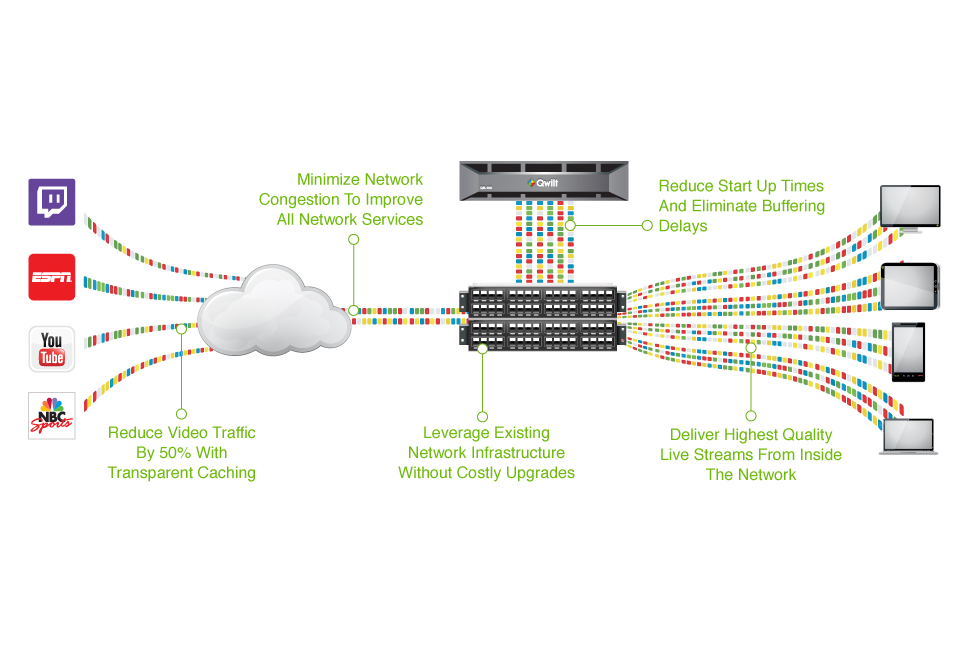 “We move the video as close as possible to the consumer, while still being just far enough away to create a caching benefit,” Mark Fisher, VP of Marketing and Business Development at Qwilt explained to DT. “We put it upstream of [at least] 10,000 consumers so that when there’s a popular video we can cache it once and deliver it to the other 8,000 people that ask for it.”
Re-routing and saving video to local transmission points like this speeds up delivery, but it also removes strain from the network or website that is broadcasting the stream. The video can be watched by large numbers without any of the commonly met problems, like that annoying loading bar. Qwilt claims it can reduce video congestion by 50 percent on networks that use its tech.
Live Stream Cache works with any live streamed event, including those sent through video-on-demand services like Netflix, Amazon Prime, Hulu, and HBO Go, along with live streaming services like ESPN, Justin TV, Twitch, NBC Sports, and YouTube Live.
Anyone who is a live streaming convert will be keen for Qwilt’s new technology to be introduced, particularly as more major events like the Super Bowl – watched online by three million people in 2013 – and the Olympics are made available online.
A virtual private network (VPN) encrypts your internet traffic and routes it through a server run by the VPN provider. Websites see the VPN server’s IP address instead of yours, and you can get around geo-blocks, censorship, and ISP throttling. The best VPN services are paid, but there are still a handful of free options that do the job well.
Most free VPNs come with a hidden cost, because running servers isn’t cheap and a company that doesn’t charge you has to make its money somewhere else. Many do so by logging your browsing activity and selling it to advertisers, while others flood you with ads and track you across apps.
There's nothing quite like curling up with a good book on a cold evening. As much as I love the feel of a physical book, books take up a lot of space, and carrying more than one on a trip quickly becomes a chore. That's where e-readers come in, and the Amazon Kindle remains one of the best options.
Amazon just refreshed its Kindle lineup with thinner, lighter designs, a new flush-front display, and colors that wrap from front to back. Add the Kindle Scribe and the Kindle Scribe Colorsoft to the mix, and you have more choices than ever before.
A good Android app should earn its place on your phone. It might make an everyday task easier, handle something the built-in software can't, or let you change an experience that never quite worked for you.
These 20 apps cover everything from quick notes and password management to automation and local file sharing. Some are free, others charge for advanced features, and a few take some effort to figure out. The point isn't to install them all. It's to find the ones that make your phone work better for you.