
“Why you can trust Digital Trends – We have a 20-year history of testing, reviewing, and rating products, services and apps to help you make a sound buying decision. Find out more about how we test and score products.“
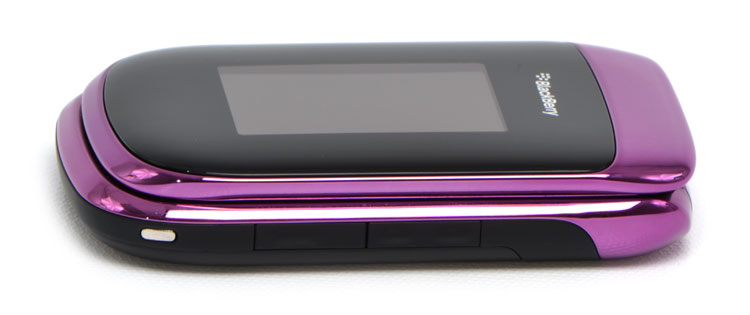 BlackBerry and style go together something like Razor scooters and cool, which is to say, they don’t. RIM may have perfected a straight-laced design that goes well with two-piece suits, polos and khakis, but originality, fashion and style are not words typically associated with the brand. The company attempts to break that mold with the purposefully named Style, a BlackBerry that discards business aspirations for a dress-down design destined for denim. But can the brand that started as a status symbol for the corporate elite ever be cool? Let’s find out.
RIM introduced its first clamshell BlackBerry with the 8220 Pearl Flip back in 2008, a design that has since been discontinued in favor of the 9670 Style. Both phones endeavored to compact the BlackBerry experience into a folding design, but the Pearl Flip omitted the signature BlackBerry QWERTY keyboard in favor of the same squashed model with two letters sharing every key. The Style, meanwhile, fattens up to accommodate the real thing, leaving one of BlackBerry’s strongest features intact.
Short of this reengineered chassis, the Style’s guts very much resemble the rest of the BlackBerry line, including a 5-megapixel camera with flash that also shoots VGA video, a 2.7-inch internal screen, Wi-Fi, 3G, GPS, an optical trackpad in place of the old scroll ball, and a microSD slot that handles cards up to 32GB (an 8GB model comes included).
The Style is unapologetically fat, both in width (2.36 inches) and depth (0.73 inches). While that makes it oversized by classic flip-phone standards, a height of only 3.78 inches when closed still makes it reasonably compact among smartphones. Rounded edges and a slick finish also help disguise its bulk by letting it slip in and out of pockets easily.
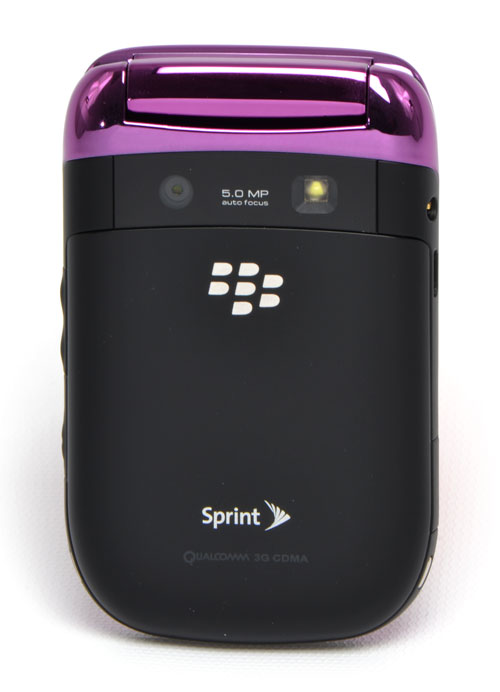
On the front, a 2-inch LCD displays an analog-style clock with the time, date, and other vitals like battery life, signal, and unread messages. A thick black bezel under the same plastic cover helps it blend into the body when off. The back sports a brushed black battery door similar to what you might find on the Bold, just below the camera and flash. The edges on our review unit came stripes in a metallic bubblegum pink, but BlackBerry also offers a steely gunmetal for a more masculine tinge. Unfortunately, they’re both merely colored plastic, and have the feel and warbled reflection to match. Materials aside, the Style does have a sturdy feel we suspect can survive a few good falls to pavement, and the hinge opens and closes with a firm snap.
With the lid closed, the Style has three exposed controls: An up and dock volume rocker, and the camera shortcut button, all on the right-hand size. The left has a microUSB slot for charging, and a standard 3.5mm stereo jack, along with the door for adding microSD cards. Open it up and you get the standard BlackBerry controls: Call, menu, return and end call, with an optical trackpad dead in the center, and the full QWERTY keyboard below.
Like BlackBerry’s flagship Bold, the Style makes use of BlackBerry OS 6.0, which brings a host of upgrades including a revamped home screen, kinetic scrolling, a new browser and universal search. All welcome additions, but let’s get this out of the way: It’s not Android or iOS. Apps don’t take center stage on the main screen, the browser still uses a cursor, and many central functions involve pressing the menu button and sifting through layers of menus. BlackBerry OS 6, while revolutionary in RIM’s marketing terms, strikes us as more evolutionary. It adds a layer of gloss, speed, and in some cases new functionality, but a BlackBerry remains fundamentally a BlackBerry.
After taking plenty of heat for its archaic browser in previous models, we most looked forward to the improved browser in BlackBerry OS 6. Unfortunately, not much has changed. Pages still load too impossibly small to see anything before zooming, reading requires copious scrolling, and load time can’t rival the Android or iPhone browser at the same pages.
The speed of OS navigation, though, has definitely improved. Menus flick open and closed instantly, and the optical trackpad makes it easy to swipe through a long list of options in a single roll of the thumb. Too easy, actually – in its default configuration many users will find it a bit scroll happy, but it can easily be fine tuned with almost absurd precision – the OS lets you tune horizontal and vertical sensitivity separately with 10 different settings.
BlackBerry App World has continued to build its app library to over 16,000 apps, but it still pales in comparison to what’s available on other platforms. Games and free software, in particular, are limited.
Our biggest gripe from the Style actually came from its abysmal Wi-Fi reception. At a distance from our router that most other phones and laptops have no problems with, it came up blank, and even when we closed in it seemed to have problems spotting networks consistently and holding connectivity.
The Style’s 2-inch external screen is a convenient as a watch and to see who’s calling, texting or e-mailing without flipping open for the real thing. With 240 x 320 resolution, it actually looks surprisingly sharp, too. The same came be said for the 2.7-inch, 360 x 400 internal display, which displays colorful photos, crisp text, and fights the sun pretty well, but still feels like observing the world through a porthole beside slate phones. (The iPhone 4, for instance, has more than quadruple the resolution, and the Droid X has a whopping 4.3 inches of display.)
BlackBerry purists who rejected the Pearl on the basis of its mini keyboard will feel right at home on the Style… for the most part. While it hasn’t been shrunken, the Style keyboard feels slightly flatter than the more pronounced keys on the Bold 9700, and the keys have a tacky noise on lifting them that almost makes it sound like they’ve suffered a Diet Coke spill. We were still able to jam out e-mails on them like no tomorrow, but they just don’t have the luxurious, surgical clack some of BlackBerry’s finer models possess.
RIM’s corporate background has always led it prioritize call quality, and despite its more casual target market, the Style is no exception. Voices came through loud and clear on both ends of the conversation through Sprint’s CDMA network in Portland, and the phone’s clamshell design took us down memory lane to a time we actually used phones that fit our heads instead of talking into bricks. Even with the QWERTY keyboard, dialing is as simple as punching in the numbers and pressing the green dial button – no on-screen gimmickry needed.
A hard camera button on the right of the phone makes it quick to pull up the camera in a hurry, but most of the time you’ll be greeted with a blurry image of your own finger. The camera sensor lies precisely where your index finger naturally wraps under the phone to support it from beneath, requiring an awkward alternate grip for shooting. Since the camera faces off axis from the screen, you’ll also find yourself shooting toward the ground too much, or bending the phone up for a proper shot, but ducking to get a view of the screen. Who thought this one through?
 Actual photo quality fares much better. The camera’s autofocus did a good job ensuring sharp snaps, but colors were more muted than the same shots we took with an iPhone 4.
Offering only VGA video was a bit of an embarrassment in 2010 when 720p became the status quo for smartphones, and in 2011 when 1080p is emerging, it’s more like a black eye. Despite the lack of resolution, video quality is decent thanks to dialed-down compression.
RIM rates the BlackBerry Style for up to 4.5 hours of talk time, 10.5 hours of standby, and 14 hours of music playback from the 1150 hour battery. Anecdotally, we found that accurate, but not terribly impressive. Even the Bold offers six hours of talk time, and larger phones like the iPhone 4 offer seven, with up to 40 hours of music playback. Even taking into account a margin for error, the Style pays the price for its small size and correspondingly small battery.
If you’re looking for a pocket computer that will do your taxes, play games that look like they belong on a PSP and surf the Web as easily as notebook computer, look elsewhere. Despite an extra layer of polish in BlackBerry OS 6, the Style is not ready to compete with the latest crop of iOs and Android superphones as a do-it-all overachiever. But with a unique clamshell design, full physical QWERTY keyboard and a $50 price tag on Sprint, it doesn’t have to. BlackBerry’s Style folds the company’s legendary messaging abilities into a compact, stylish (yes, we said it) package that does what a phone needs to do, and then some. For a text-happy teen, style-conscious adult or just someone who wants a practical clamshell design in a smartphone, BlackBerry’s Style will hit the spot.
At the 2026 Android Dev Summit, Google has announced some interesting features coming to both Android XR and Android CLI. Developers can now build and test apps for smart glasses without owning the hardware, while Android's command-line tools are getting upgrades that help AI coding agents test applications and identify performance problems. Both announcements could eventually mean better apps for both Android and extended reality hardware users.
Building Android XR apps without owning smart glasses
Google updated its adaptive Compose skill to help developers adapt existing Android apps for laptops, foldable phones, tablets, and other form factors, including the upcoming Googlebook platform. The goal of this update is to help AI coding agents customize apps for different screen sizes and input methods without developers having to maintain separate codebases for different devices.
The new skill goes beyond responsive layouts, adding support for desktop-focused features and foldable-specific interface adjustments. Google is also signaling that adaptive app experiences will be more prominent on Google Play, with the company planning to pay more attention to how apps and games perform on foldable devices next year.
Meta wants to make its AI feel like a cute tiny friend through a newly launched pet journal app called Waddle World. Think of it as Tamagotchi, but the pixelated pet can actually chat with you and doodle little illustrations based on what you tell it about your day. Right now, this free app is available on iOS and Android only in the Philippines, with access limited to adults.
Waddle World is a pet that wants to know about your day