
“Why you can trust Digital Trends – We have a 20-year history of testing, reviewing, and rating products, services and apps to help you make a sound buying decision. Find out more about how we test and score products.“
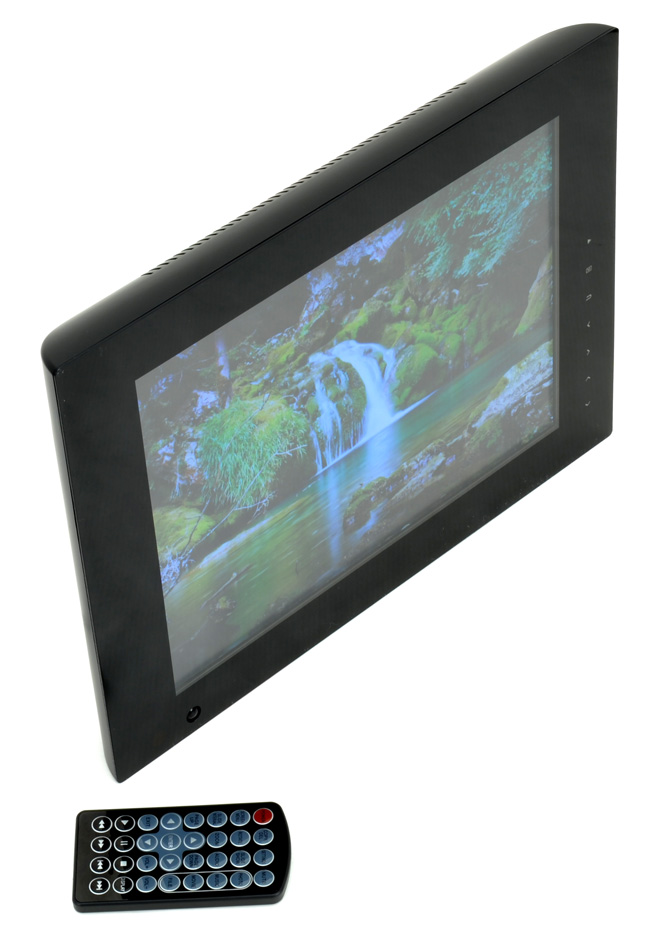 In the digital world, digital photo frames are the equivalent of socks, rarely getting attention and often found with deep discounts at major big box retailers or generic second-hand stores. Some of the larger tech manufacturers out there, like HP and Sony, have all but given up on this dying category of products. Instead, there have been a crop of second-string companies you might not have heard of introducing new photo frames.
NIX Digital, a company that has been around since 2007, and that specializes in making digital picture frames, thinks it has a new concept on its hands: A picture frame that detects movement and turns on when someone enters the room. NIX claims that intelligently turning the frame off cuts down on energy costs and increase the life of the LCD display. Another unique feature of this picture frame is the size – 12 inches. Most frames on the market come in either 8 or 10 inches. Other features include a high resolution 800 x 600 pixel SVGA back-lit LCD display, 2GB of internal memory, a headphone jack, touch sensitive controls on the bezel, remote control, and support for JPEG images in addition to MP4 video files and MP3 music.
Our NIX Hu-Motion picture frame came in a large, glossy black box with the frame itself wrapped in a synthetic, cheap-feeling velvet cover. NIX includes a small remote control, which you can use to switch between modes on the frame, zoom in on picture, as well as pause and play the slide show among other features. The remote control feels rather light; it would have been nice if they simply added some weight to it to give the impression of a high-end remote. The picture frame itself looks pleasant with a nice glossy black finish – it should look good in any decor, just don’t turn the frame around or you will quickly see the thickness of it, and the cheap-looking plastic stand.
There are two basic ways to get media onto the NIX Hu-Motion: You can either put pictures and content onto an SD card and plug that into the frame, or use the included USB cord to connect the NIX Hu-Motion to your PC. Once connected to your PC, the NIX Hu-Motion shows up as an external storage device, allowing you to drag and drop images over onto it. The NIX Hu-Motion comes with 2GB of internal memory, which should be good enough for thousands of pictures at the relatively low native resolution – less if you don’t decide to resize them first.
The remote control works fine and gives you plenty of controls directly on it. This is a double-edged sword, as finding the basic controls can be difficult at times amongst the clutter.
Menu navigation is pretty straightforward. It would be nice to be able to exit out of the menu by pushing the button of another category rather than having to hit the “exit” button and then navigating over.
Pictures look fairly sharp on the LCD display, and there is minimal light bleeding from the edges, which helps in dim environments. Because the frame uses a 4:3 aspect ratio, we did experience black bars above and below the pictures being viewed. Zooming in of course removes those, but you lose part of the picture as well. The built-in motion detector worked as advertised.
Lets make this perfectly clear: You are not buying the NIX Hu-Motion for it’s music and movie capabilities. Music sounds muddy, bass is non-existent and the internal speakers distort at medium to high volume. When we tried to simply use headphones, we had to fiddle with the connector to make them work. If they were plugged in all the way, we got sound from one ear forcing us to keep it halfway unplugged for it to work in stereo. We couldn’t get our .MP4 test videos to work at all.
The NIX Hu-Motion is a product with a lot of promise. It has some good features like the built-in motion detector, but for the price, there are many better options out there. Kodak, Sony and Toshiba all make frames in this price range, and while they are smaller at eight to 10 inches, they offer more features like built-in Wi-Fi and better compatibility with other memory cards. Plus, they have a lot better build quality in our opinion; Kodak even has frames available in real wood, which is a nice touch.
The OnePlus Buds Clip are a new pair of open-ear earbuds built around a simple convenience. They join Sony’s LinkBuds Clip in the growing ear-cuff category, but either OnePlus bud can go on either ear.
Sensors recognize how the earbuds are being worn and route the audio channels accordingly. There’s no label to check before putting them on, and the feature also works when only one bud is used.
We buy fitness bands and activity trackers to keep tabs on our exercise, but it is easy to forget to start tracking or switch modes when moving between different activities. For Fitbit and Pixel Watch users, that could soon become a lot less annoying, as Google is rolling out a major upgrade to automatic activity tracking that can recognize more than 100 types of exercise, up from just 10 before.
Google first showed off the improved tracking earlier this month alongside the Fitbit Edge. It is now coming to Fitbit Air and the Pixel Watch 3, 4, and 5, and Google claims the added context behind the system makes workout detection nearly twice as accurate while cutting missed activities by more than half. Fitbit Edge will support it too.